Product Case Study · 2025

Making Tab Management a
First-Class Experience
in Google Chrome

Chrome has the tools. Users just cannot find them. A deep dive into why 2 million people install a third-party extension to solve a problem Chrome already built a native answer for.

Role Product Manager (Practice)
Platform Desktop · Web Browser
Focus Feature Activation & Discoverability
Industry Productivity / Browser

TL;DR

The Problem

2 million people installed a third-party extension to solve a problem Chrome already built the answer for. That is the entire case study.

The Strategy

No new features. No engineering budget for new capabilities. Just surfacing what Chrome already built, at the three moments users need it most.

North Star

If this number goes up, the discoverability gap has closed. If it stays flat, the features are still invisible.

01 · Overview

The problem hiding in plain sight.

Google Chrome is the world's dominant browser with 3.6 billion users and over 67% global market share. Over the past few years Chrome has built out a solid set of native tab management tools: Tab Groups, Saved Groups, Reading List, and an AI-powered Tab Organizer.

The issue is not the features themselves. It is that nobody knows they exist. Every one of them lives in a right-click menu, a buried settings page, or behind an experimental flag. Chrome never actually guides users toward them.

The result: over 2 million people install OneTab, a third-party extension, to solve a problem Chrome already has a native answer for. The tools are there. Users just cannot find them.

Before Tab overload
Can't tell what any tab is

18 tabs open. No labels visible. No groups. No way to know what is what.

After Tab Groups active
Work
Notion
Slack
Research
Reddit
Chrome
Shopping
Amazon

Same tabs, organized. Named groups, color-coded, collapsible. Built into Chrome already.

02 · The Signal

What users are telling us.

55%
Feel overwhelmed by open tabs

13% say they cannot even count how many tabs they have open at any given moment.

2M
Users install OneTab instead

2 million people use a third-party extension to solve a problem Chrome already built a native answer for.

0
Guided discovery moments in Chrome

Every native tab tool — Tab Groups, Reading List, AI Organizer — sits behind a right-click or a buried flag.

I spent time going through 50+ reviews and threads across Reddit, the Chrome Web Store, Product Hunt, and developer forums. A few things kept coming up:

  • 55% of internet users say they feel overwhelmed by how many tabs they have open. 13% say they cannot even count them. (aboutchromebooks.com)
  • Users talk about losing context, crashing sessions, and spending more time managing tabs than actually doing the work they opened them for.
  • A senior reporter at Digital Trends admitted he dismissed Chrome's tab organizer notification probably a dozen times before finally trying it. His words: it completely changed how I use Chrome. (Digital Trends)
  • OneTab has 2 million users. (Chrome Web Store) It saves tabs with one click. Chrome does the same thing natively. Most users have no idea.
"I didn't know about this feature for a while, and I suspect a lot of other Chrome users didn't, either." Digital Trends
"I just wanted one-click merging of all my tabs. Something stupidly simple, because work is hard enough." DEV Community
"Tab Groups is one of those Chrome hidden features that you'll wish you had discovered sooner." Logic Matters
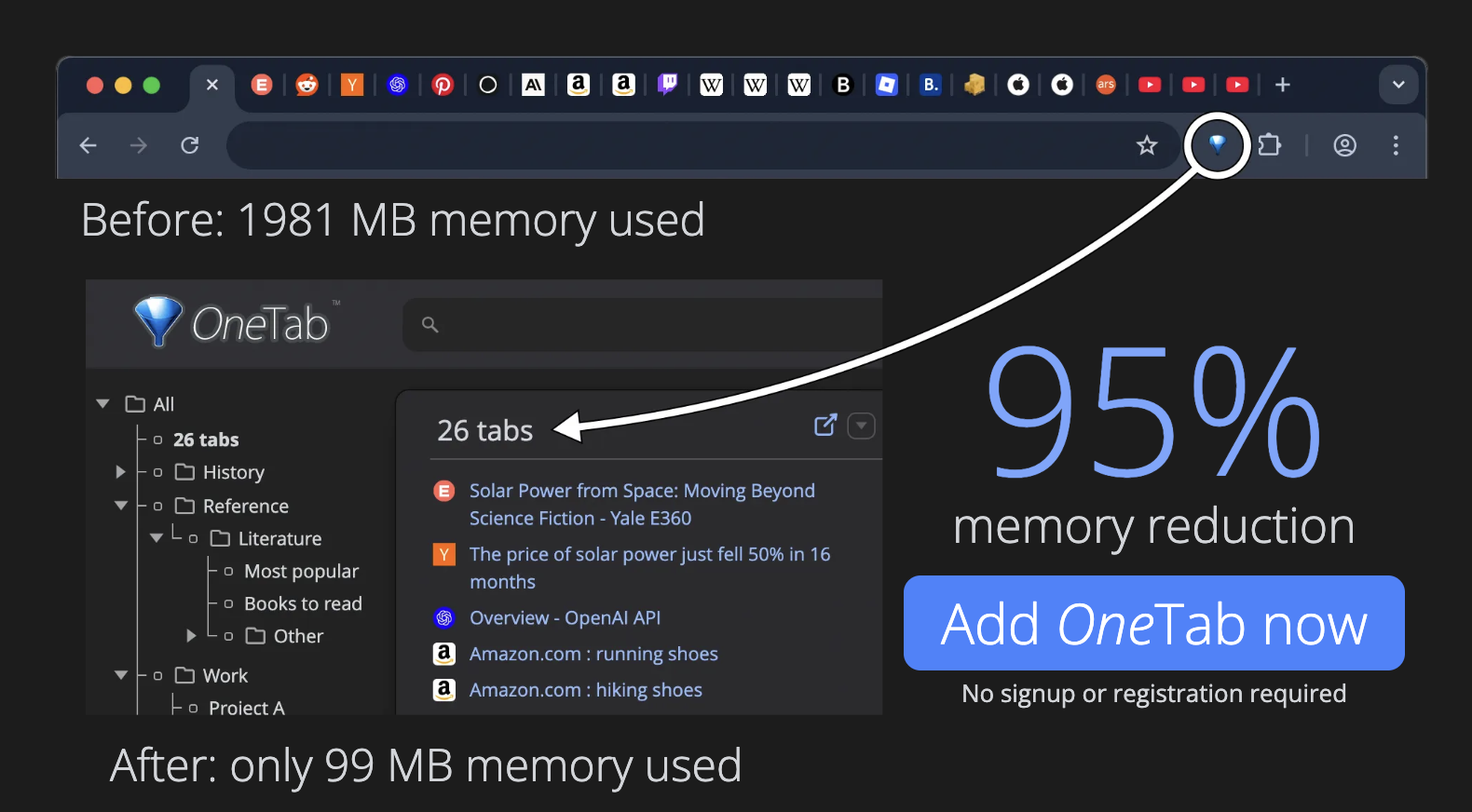
OneTab extension showing 26 tabs collapsed with 95% memory reduction
OneTab collapses all open tabs into a single list with one click. 2 million Chrome users rely on it to solve a problem Chrome already built natively.
03 · The Market

How other browsers handle this.

Browser Tab management Discoverability Surfaces it
Edge

Collections on toolbar, vertical tabs, sleeping tabs visible on first launch

High Yes
Safari

Tab Groups sync via iCloud across all Apple devices, side panel layout

High Yes
Arc

Tab organization is the entire interface. Not an option — it is the product.

Very High Yes
OneTab

One-click collapse of all tabs to a list, saves up to 95% memory instantly

High Yes
Chrome

Tab Groups, Saved Groups, Reading List, AI Organizer, Memory Saver — all built in

Low No

Chrome is the only major browser where these features require you to already know they exist. Every other browser surfaces tab management on day one.

Edge

When you open Edge for the first time on Windows, a Collections icon appears pinned to the right side of the toolbar — no setup, no hunting through menus. Right-click any tab and "Add to Collections" is the second option in the menu. Microsoft treats it as a core browsing action, not a hidden feature.

Safari

On a new Mac, Safari prompts you to create a Tab Group the first time you open multiple tabs for the same topic. On iPhone, Tab Groups live at the bottom of the screen in the tab switcher — you see them before you see your open tabs. Apple made organization unavoidable.

Arc

Arc ships with no traditional tab bar. Every URL you open lands inside a Space, which is Arc's version of a workspace. You cannot use Arc without immediately engaging with its organization system — the product and the organization layer are the same thing.

OneTab

One click on the OneTab extension icon collapses every open tab into a single timestamped list. No naming required, no setup, no decisions. The value is delivered before the user has a chance to dismiss anything. That frictionless moment is exactly what Chrome's native equivalent never achieves.

04 · The Problem
The Problem

Chrome users dealing with tab overload have no guided path to discover or use the browser's native tab management tools. So millions of them install third-party extensions to solve a problem Chrome already built a native answer for.

This is not a feature gap. It is an activation gap. Every tool a user needs already exists inside Chrome. The product just never shows it to them.

05 · Product Strategy

Surface what already exists.

Three intervention points
01
New install

One-time card during first-run setup introduces Chrome's built-in tab tools before the user ever needs them.

Setup card
02
8 or more tabs open

Contextual prompt appears above the tab strip. One tap organizes everything. No settings required.

Tab prompt
03
New tab page

Tab Tools panel sits permanently below the search bar. Collapsible after first interaction, always accessible.

Discovery panel
North Star Metric
Tab Groups activation rate within 30 days

The percentage of active Chrome users who create or interact with at least one Tab Group within 30 days of a new install or first-time feature exposure.

The strategy here is not about building new features. It is about surfacing what Chrome has already built, at the exact moment users need it most. There are three points in the experience where this makes the most sense.

North Star Metric

Tab Groups Activation Rate

The percentage of active Chrome users who create or interact with at least one Tab Group within 30 days of a new install or first-time feature exposure.

The three levers I focused on:

06 · The Solution

Three surfaces. Zero new features.

01
Contextual Tab Overload Prompt
NEW
chrome.com/newtab
Gmail
Notion
Reddit
GitHub
Twitter
Figma
Jira
+3
Looks like you've got a lot going on. Want Chrome to organize these?
Page content...

Triggers at 8 open tabs on first occurrence in session. One tap delivers immediate value. No settings required.

02
Tab Tools Panel on the New Tab Page
NEW
Tab Tools Dismiss
🗂️
Tab Groups
Organize by topic or project
Try it
📖
Reading List
Save tabs for later
Try it
Memory Saver
Free up RAM from idle tabs
Try it

Visible to all users on every new tab. Collapses after first interaction and never returns.

03
One-Time Onboarding Card on New Install
NEW
Chrome has built-in tools to help you stay organized
Keep your tabs under control from day one.
🗂️
Tab Groups
Group and color-code tabs by topic
📖
Reading List
Save pages to read without keeping the tab open
Memory Saver
Automatically unloads tabs you are not using
Try it now
Skip for now

Shown once during first-run setup, right after sign-in. Fully skippable. Never shown again.

01

Contextual Tab Overload Prompt

When someone reaches 8 open tabs for the first time in a session, Chrome shows a single, non-intrusive prompt: "Looks like you've got a lot going on. Want Chrome to organize these for you?" Two options: Organize tabs (which triggers the AI Tab Organizer) or Not now. One tap, immediate value, no digging through settings required.

02

Tab Tools Panel on the New Tab Page

A small persistent section on the new tab page, sitting just below the search bar, showing three native tools with plain one-line descriptions: Tab Groups, Reading List, and Memory Saver. Each one has a single button that triggers the feature directly. It is visible to all users and collapses after the first time someone interacts with it.

03

One-Time Onboarding Card on New Install

During first-run setup, right after the sign-in step, a single card introduces Chrome's tab tools: "Chrome has built-in tools to help you stay organized." Three icons, three features, one Try it now button. Fully skippable. Never shown again once dismissed.

07 · Measuring Success

What good looks like.

North Star Tab Groups Activation Rate Users who create or use a Tab Group within 30 days of install or first exposure
Primary Metrics
Contextual prompt acceptance rate Goes up
Onboarding card engagement rate on new install Goes up
Tab Tools panel interaction rate on new tab page Goes up
Counter Metrics
New tab page bounce rate Stays flat
Tab management extension installs Goes down
Rollout Plan
10% US desktop
4-week test
50% if positive
Full US rollout
International
North Star
Tab Groups activation rate within 30 days of new install or first feature exposure
Primary
Contextual prompt acceptance rate
Onboarding card engagement rate (new installs)
Tab Tools panel interaction rate on new tab page
Counter Metrics
New tab page bounce rate (should stay flat)
Tab management extension installs (should decrease)
Rollout Plan
A/B test: 10% of new Chrome installs in US desktop
Run for 4 weeks; expand to 50% if primary metrics improve without counter regression
Full US rollout, then international
08 · Reflection

The features exist.
The problem is the path to them.

I picked 8 open tabs as the trigger threshold without actually validating it. That number came from the research average, but I should have tested whether 8 is really the frustration peak or whether it varies by user type. A student might hit that wall at 6. A developer might not feel it until 20. Before locking in a single number I would want to segment by behavior patterns first.

I also did not pressure-test whether discoverability alone is enough to solve this. My strategy assumes that if users find Chrome's tab tools they will use them and keep using them. But there is a real chance someone tries Tab Groups once, finds it more manual than OneTab's one-click simplicity, and goes straight back to the extension. I would want to track repeat usage at day 7 and day 30, not just first activation.

All my research was desk-based. In a real setting I would run 5 to 8 interviews with people who have OneTab installed and ask one question: did you know Chrome already does this? Those conversations would either confirm the discoverability hypothesis or surface something desk research would never find.

What I assumed
  • 8 open tabs is the universal frustration threshold
  • Discoverability alone solves adoption
  • Users who find Tab Groups will keep using them
  • Desk research gives sufficient signal on user pain
What I would test instead
  • Segment threshold by user type: students, developers, casual browsers
  • Measure repeat usage at day 7 and day 30, not just first activation
  • Run 5 to 8 interviews with OneTab users: did you know Chrome does this?
  • Test whether auto-grouping on by default outperforms opt-in
Sources